
With the ignition off, press and hold the daily mileage reset button. Turn on the ignition and release the button. After this, the instrument cluster goes into the "test" mode: the arrows of all instruments move three times over the entire scale range and all segments of the liquid crystal indicator (LCD) are illuminated.
Clear the memory of the electronic instrument cluster processor by pressing the odometer reset button and holding it for at least 5 seconds.
Retest. Then briefly press and release the odometer reset button. The LCD will display the processor software version number ("Uer 0.8", "Uer 1.1" or other).
Pressing the reset button again will display one of the following codes:
- 0 – no faults;
- 1 – the microprocessor is faulty;
- 2 – open circuit of the fuel level indicator sensor;
- 4 – increased voltage in the on-board network (more than 16+1.8 V);
- 8 – low voltage in the on-board network (less than 8–0.6 V).
If there are several faults, the corresponding sum of codes is displayed, for example: "6" (2+4), "10" (2+8), "12" (4+8), "14" (2+4+8).
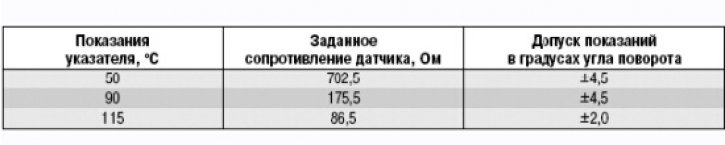
You can also check the coolant temperature gauge. To do this, use the reference data in the table.
(The text is published on the portal: www.VAZbook.ru)
Coolant Temperature Gauge Check Data