
English Русский
Български
Беларускі
Український
Српски
Hrvatski
Română
Polski
Slovenský
Magyar
| Articles | Contacts | Sitemap |   
Repair and maintenance Lada Repair and maintenance Mazda Repair and maintenance Mitsubishi Repair and maintenance Toyota Repair and maintenance Land Rover Repair and maintenance Hyundai Repair and maintenance Nissan
VAZbook.ru


Main     1111   2101   2105   2106   2107   2109   2110   2115   2121  
VAZ-2110 (1995-2007) VAZ-2112 (1999-2007)
  • Main
  • «Lada»
  • VAZ-2110
  • General information
  • User manual
  • Liquid crystal display

Liquid crystal display (VAZ-2110)

            0

The top line displays the total or daily mileage counters (optional). To switch between the display modes ("ring"), use button 8 in the instrument cluster. If the daily mileage counter is displayed, press and hold the button for more than 3 seconds to reset it.

The bottom line displays the time, outside temperature or trip computer functions (optional). The windshield wiper stalk buttons are used to switch between display modes and control functions:
  • key 1 "Reset" (Fig. 30);
  • key 2 switches functions "on the ring" forward and backward.
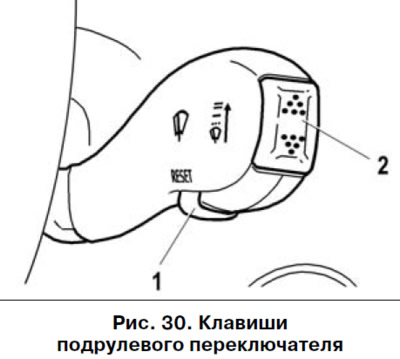
key 2 switches functions «on the ring» forward and backward.


Setting the clock


To enter the clock setting mode from the time display mode, press and hold the "Reset" key for more than 3 seconds. In the time setting mode, the hours and minutes will flash.

The minutes are set by pressing the function switch key "on the ring" forward. When the key is held down briefly, the minutes value increases by "1". If the key is held down longer, the minutes value increases during the first 3 s with a 1 s step, and then with a 0.25 s step (the increase in the value of minutes is accelerating).

The clock is set by pressing the function switch key "ringwise" backwards.


Setting the minutes resets the seconds counter. Setting the hours does not affect the seconds counter.

The text is taken from the online resource: VazBook.ru

Return from the time setting mode to the time indication mode is performed by briefly pressing the "Reset" button. If no button on the windshield wiper switch is pressed for 60 seconds in the time setting mode, the return to the time indication mode occurs automatically.

More detailed information about the functions is provided in Table 1.
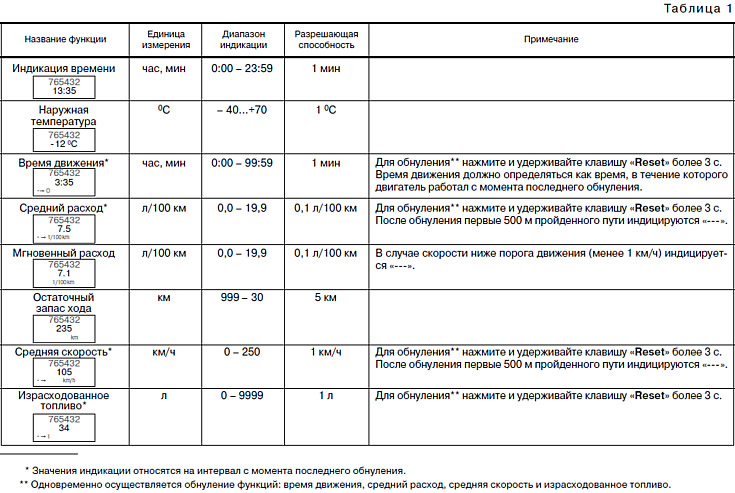
More detailed information about the functions is provided in Table 1.


This article is available at russian, bulgarian, belarusian, ukrainian, serbian, croatian, romanian, polish, slovak, hungarian
The text was reviewed by the specialist: Grigory Vologodtsev

Share with friends:

Previous articles
VAZ-2110: User manual
Next articles

Instrument cluster in a variant design
Instrument cluster
Instrument panel in a variant design
Instrument panel
Design features of the LADA 21123 «coupe» and LADA 21128 «coupe»
Ignition switch
Electronic anti-theft system
Steering column switches
Control units
On-board control system indicator unit

More articles from other manuals on VAZ cars:
➠ Checking the level and density of the liquid in the cooling… VAZ-21011 (1974-1983)
➠ Checking the level and density of the liquid in the cooling… VAZ-21051 (1979-2010)
➠ Checking the level and density of the liquid in the cooling… VAZ-21213 (1994-2006)
Link in different formats to this page


Visitor comments

No comments yet


How much will 12 + 15 ?


VAZ-2110 (1995-2007) 
  • General information
  • Vehicle description
  • Specifications
  • User manual
  • Maintenance
  • Operation and maintenance
  • Tips for car owner
  • Power unit
  • Engine repair
  • Supply system
  • Control system
  • Cooling system
  • Exhaust system
  • Transmission
  • Clutch
  • Car gearbox
  • Front wheel drives
  • Chassis
  • Suspension and wheels
  • Steering
  • Brake system
  • Body
  • Exterior
  • Interior
  • Doors and glass
  • Tailgate
  • Ventilation and heating
  • Electrical equipment
  • Equipment and devices
  • Headlights and lighting
  • Engine electrics
  • Electrical circuits


VAZ-2112 (1999-2007) 
  • General information
  • Operation and maintenance
  • Power unit
  • Engine repair
  • Supply system
  • Control system
  • Cooling system
  • Exhaust system
  • Transmission
  • Clutch
  • Car gearbox
  • Front wheel drives
  • Chassis
  • Wheels and tires
  • Car suspension
  • Steering
  • Brake system
  • Body
  • Exterior
  • Interior
  • Doors and glass
  • Tailgate
  • Ventilation and heating
  • Electrical equipment
  • Equipment and devices
  • Headlights and lighting
  • Engine electrics
  • Electrical circuits


VAZbook.ru © 2017 · Mobile version · Contact with administration · Sitemap: EN BG BY UA RS HR RO PL SK HU · Site search · News and articles VAZ-1111 · VAZ-11113 · VAZ-2101 · VAZ-21011 · VAZ-2104 · VAZ-2105 · VAZ-21051 · VAZ-2106 · VAZ-21061 · VAZ-2107 · VAZ-21099 · VAZ-2109 · VAZ-2108 · VAZ-2110 · VAZ-2112 · VAZ-2114 · VAZ-2115 · VAZ-2121 · VAZ-21213 · VAZ-21214 ·
The site stores technical data using cookies to improve the service.