English Русский
Български
Беларускі
Український
Српски
Hrvatski
Română
Polski
Slovenský
Magyar
| Articles | Contacts | Sitemap |   
Repair and maintenance Lada Repair and maintenance Mazda Repair and maintenance Mitsubishi Repair and maintenance Toyota Repair and maintenance Land Rover Repair and maintenance Hyundai Repair and maintenance Nissan
VAZbook.ru


Main     1111   2101   2105   2106   2107   2109   2110   2115   2121  
VAZ-2104 (1984-2012) VAZ-2105 (1979-2010) VAZ-21051 (1979-2010)
  • Main
  • «Zhiguli»
  • VAZ-2104
  • Electrical equipment
  • Equipment and devices
  • Instrument cluster model 2105 — removal and replacement of lamps

Instrument cluster model 2105 — removal and replacement of lamps (VAZ-2104)

            0

Contents: Removal ↓ Replacing indicator lamps ↓ Replacing the backlight lamps of the…↓ Replacing the indicator lamps ↓ Replacing the cigarette lighter…↓ Installation ↓
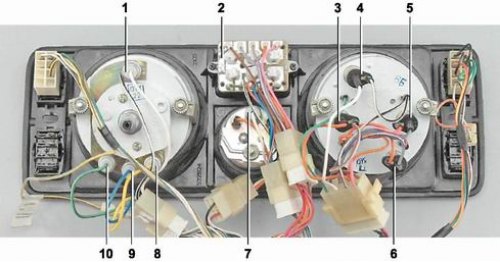
Location of lamps on the instrument panel: 1 - speedometer backlight lamp (AMH 12-3-1 (T3W); 2 -…

Location of lamps on the instrument panel: 1 - speedometer backlight lamp (AMH 12-3-1 (T3W); 2 - signaling unit (A 12-1,2 (W1,2W); 3 - battery charge indicator lamp (AMH 12-3-1 (T3W); 4 - Instrument cluster illumination lamp (AMH 12-3-1 (T3W); 5 - Low oil pressure warning lamp (AMH 12-3-1 (T3W); 6 - Fuel reserve indicator lamp (AMH 12-3-1 (T3W); 7 - voltmeter backlight lamp (AMH 12-3-1 (T3W); 8 - control lamp for switching on external lighting (AMH 12-3-1 (T3W); 9 - indicator lamp for turning on direction indicators (AMH 12-3-1 (T3W); 10 - High beam indicator lamp (AMH 12-3-1 (T3W)


Removal


1. Prepare the vehicle for operations (see "Preparing a car for maintenance and repair").

2. Disconnect the wire from the negative terminal of the battery (see "Battery - Removal and Installation").

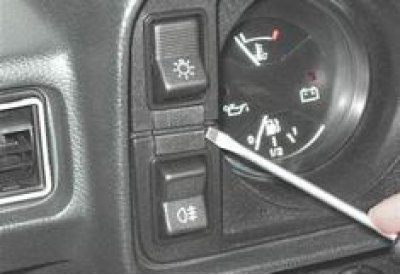
3. Using a thin screwdriver, remove the two screw caps securing the shield.

3. Using a thin screwdriver, remove the two screw caps securing the shield.


4. Using a Phillips screwdriver, unscrew the two screws.
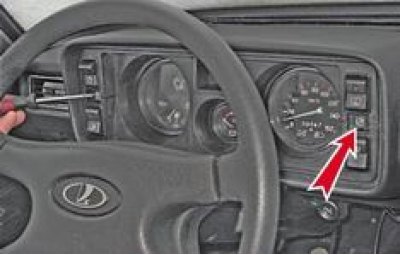


4. Using a Phillips screwdriver, unscrew the two screws.


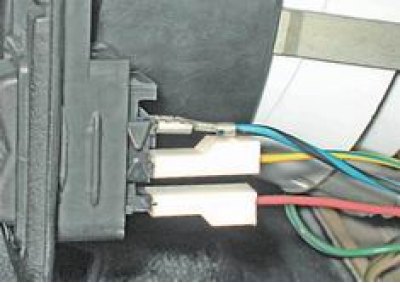
5. Disconnect the wires from the fan switch terminals. The top wire is blue-black, the middle wire is yellow-blue, the bottom wire is red.

5. Disconnect the wires from the fan switch terminals. The top wire is blue-black, the middle wire…


Tip: To avoid injury from protruding switch plugs when disconnecting the speedometer drive cable, we recommend removing the switch by squeezing its latches.


6. Having moved the instrument panel as far to the left as possible, we unscrew the knurled nut securing the speedometer cable by hand and disconnect the cable.
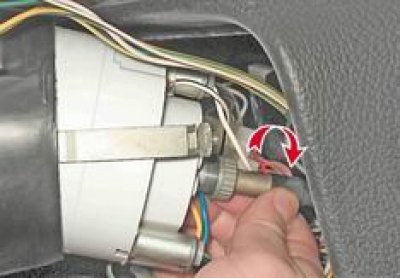
6. Having moved the instrument panel as far to the left as possible, we unscrew the knurled nut…


7. Disconnect the three colored connectors of the instrument cluster wiring harness (red, green and white) from the instrument panel wiring harness.
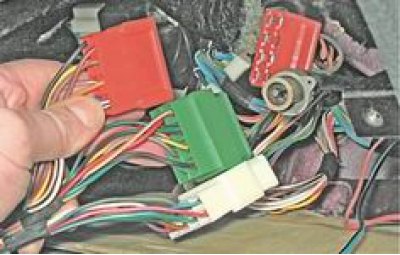

7. Disconnect the three colored connectors of the instrument cluster wiring harness (red, green and…


8. Moving to the right, remove the instrument panel.
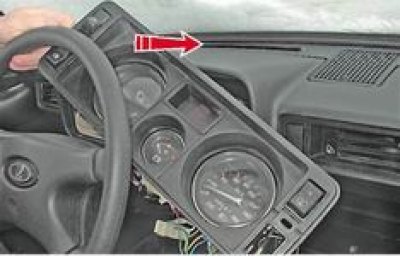
8. Moving to the right, remove the instrument panel.


Replacing indicator lamps


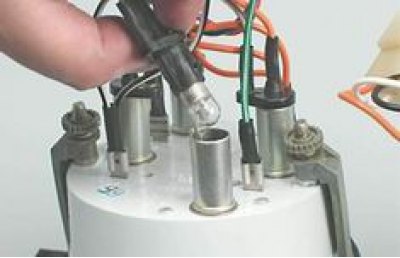
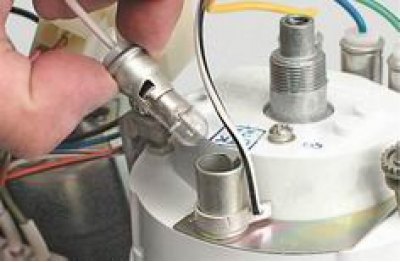
1. Remove the socket with the lamp from the housing.

1. Remove the socket with the lamp from the housing.


2. Press and turn counterclockwise to remove the lamp from the socket and install a new one.

2. Press and turn counterclockwise to remove the lamp from the socket and install a new one.


Replacing the backlight lamps of the instrument cluster, speedometer and voltmeter


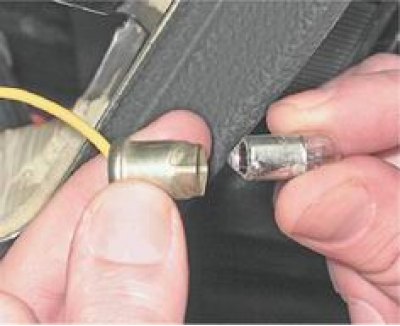
1. Using a screwdriver, remove the lamp socket from the lamp housing.
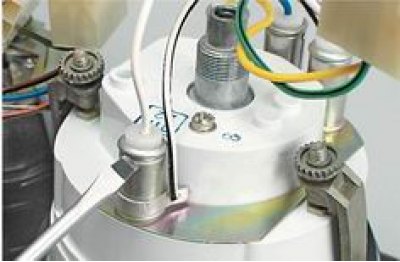
1. Using a screwdriver, remove the lamp socket from the lamp housing.


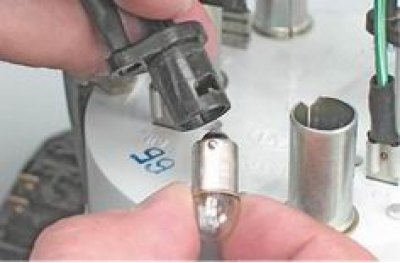
2. Press and turn counterclockwise to remove the lamp from the socket.

2. Press and turn counterclockwise to remove the lamp from the socket.


Replacing the indicator lamps


1. Turn the lamp holder 90° until its protrusion matches the slot in the board, and remove the holder with the lamp from the hole in the board.

1. Turn the lamp holder 90° until its protrusion matches the slot in the board, and remove the…


2. Replace the lamp together with the socket.

(The article is copied from the website: VAZbook.ru)

Replacing the cigarette lighter socket light bulb


We replace the cigarette lighter socket illumination lamp with the instrument panel removed.

1. By squeezing the walls of the lamp housing, we disconnect it together with the lamp from the cigarette lighter housing.
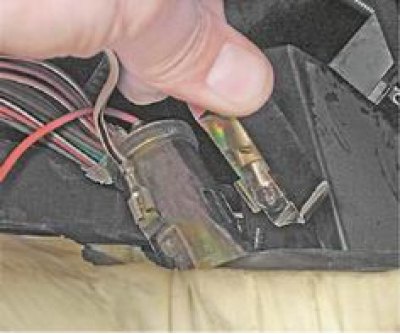
1. By squeezing the walls of the lamp housing, we disconnect it together with the lamp from the…


2. Remove the lamp holder from the casing.

3. Press and turn counterclockwise to replace the lamp.

3. Press and turn counterclockwise to replace the lamp.


Installation


Installation of all removed parts is carried out in reverse order.


This article is available at russian, bulgarian, belarusian, ukrainian, serbian, croatian, romanian, polish, slovak, hungarian
The text was reviewed by the specialist: Grigory Vologodtsev

Share with friends:

Previous articles
VAZ-2104: Equipment and devices
Next articles

Electric pump and reservoir for the windshield washer of the luggage compartment door — removal and installation
Windshield Washer Electric Pump — Removal and Installation
Motor-reducer of the windshield wiper of the luggage compartment door — removal and installation
Windshield wiper motor-reducer — removal and installation
Steering column switches — removal and installation
Instrument cluster model 2107 — removal and replacement of lamps
Model 2107 Radio Receiver Panel Upper Insert — Lamp Replacement
Key switches — replacement

More articles from other manuals on VAZ cars:
➠ Replacing control instruments and lamps in the instrument cluster VAZ-21061 (1976-2006)
➠ Replacing the indicator lamps in the instrument cluster VAZ-2115 (1997-2012)
➠ Instrument cluster VAZ-1111 (1988-1996)
➠ Instrument cluster of VAZ-2101 and VAZ-2102 cars VAZ-2101 (1970-1983)
➠ Instrument cluster and key switches VAZ-2107 (1982-2012)
Link in different formats to this page


Visitor comments

No comments yet


How much will 44 + 35 ?


VAZ-2104 (1984-2012) 
  • General information
  • Operation and maintenance
  • Power unit
  • Engine repair
  • Fuel system (carburetor)
  • Fuel system (injector)
  • Control system
  • Cooling system
  • Exhaust system
  • Transmission
  • Clutch
  • Car gearbox
  • Cardan gear
  • Rear axle
  • Chassis
  • Front suspension
  • Rear suspension
  • Wheels and tires
  • Steering
  • Brake system
  • Body
  • Exterior
  • Interior
  • Doors and glass
  • Ventilation and heating
  • Electrical equipment
  • Equipment and devices
  • Headlights and lighting
  • Engine electrics
  • Electrical circuits


VAZ-2105 (1979-2010) 
  • General information
  • Vehicle description
  • Vehicle device
  • Vehicle operation
  • Maintenance
  • Power unit
  • Engine repair
  • Cooling and lubrication system
  • Supply system
  • Transmission
  • Clutch
  • Car gearbox
  • Cardan gear
  • Rear axle
  • Chassis
  • Suspension and shock absorbers
  • Steering
  • Brake system
  • Body
  • Body elements
  • Electrical equipment
  • Engine electrics
  • Equipment and devices


VAZ-21051 (1979-2010) 
  • General information
  • Introduction to guide
  • User manual
  • Troubleshooting
  • Power unit
  • Engine repair
  • Engine repair VAZ-2103
  • Cooling system
  • Lubrication system
  • Power and exhaust system
  • Fuel injection
  • Transmission
  • Clutch
  • Car gearbox
  • Cardan gear
  • Rear axle
  • Chassis
  • Suspension and shock absorbers
  • Steering
  • Brake system
  • Body
  • Exterior
  • Interior
  • Doors and windows
  • Electrical equipment
  • Equipment and devices
  • Engine electrics
  • Ignition system
  • Electrical circuits


VAZbook.ru © 2017 · Mobile version · Contact with administration · Sitemap: EN BG BY UA RS HR RO PL SK HU · Site search · News and articles VAZ-1111 · VAZ-11113 · VAZ-2101 · VAZ-21011 · VAZ-2104 · VAZ-2105 · VAZ-21051 · VAZ-2106 · VAZ-21061 · VAZ-2107 · VAZ-21099 · VAZ-2109 · VAZ-2108 · VAZ-2110 · VAZ-2112 · VAZ-2114 · VAZ-2115 · VAZ-2121 · VAZ-21213 · VAZ-21214 ·
The site stores technical data using cookies to improve the service.