
English Русский
Български
Беларускі
Український
Српски
Hrvatski
Română
Polski
Slovenský
Magyar
| Articles | Contacts | Sitemap |   
Repair and maintenance Lada Repair and maintenance Mazda Repair and maintenance Mitsubishi Repair and maintenance Toyota Repair and maintenance Land Rover Repair and maintenance Hyundai Repair and maintenance Nissan
VAZbook.ru


Main     1111   2101   2105   2106   2107   2109   2110   2115   2121  
VAZ-2108 (1984-2003) VAZ-2109 (1984-1997) VAZ-21099 (1990-2004)
  • Main
  • «Sputnik»
  • VAZ-21099
  • Power unit
  • Engine repair
  • Replacing and adjusting the camshaft drive belt

Replacing and adjusting the camshaft drive belt (VAZ-21099)

            0

For ease of understanding, the process of replacing and adjusting the tension of the camshaft drive belt is shown on a removed engine.

Before you begin: remove the alternator belt (see subsection 3.8.).
Before you begin: remove the alternator belt (see subsection 3.8.).


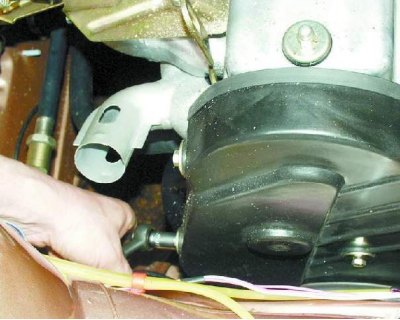
1. Remove the three bolts and the front camshaft drive cover.
1. Remove the three bolts and the front camshaft drive cover.


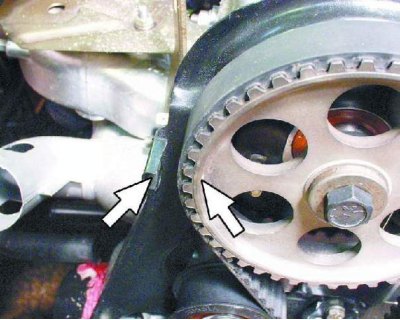
2. Set the piston of the first cylinder to TDC. To do this, turn the crankshaft by the crankshaft pulley mounting bolt so that the mark on the camshaft pulley is opposite the mark (antenna) on the rear cover of the camshaft drive.
2. Set the piston of the first cylinder to TDC. To do this, turn the crankshaft by the crankshaft…


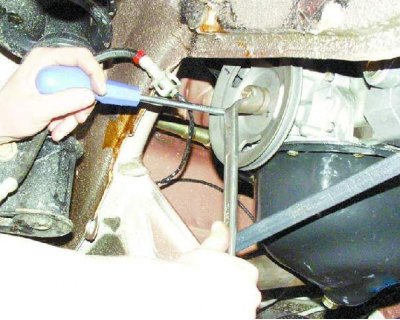
3. Loosen the crankshaft pulley mounting bolt, securing the shaft from turning with a screwdriver.


3. Loosen the crankshaft pulley mounting bolt, securing the shaft from turning with a screwdriver.


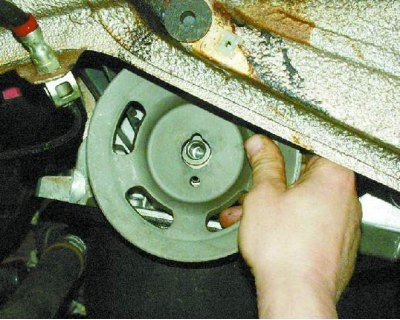
4. Remove the pulley from the crankshaft.
4. Remove the pulley from the crankshaft.


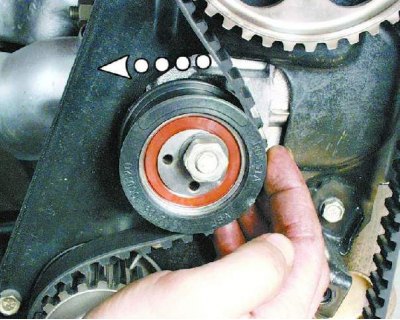
5. Loosen the tension roller mounting nut and turn the roller to relieve belt tension.
5. Loosen the tension roller mounting nut and turn the roller to relieve belt tension.


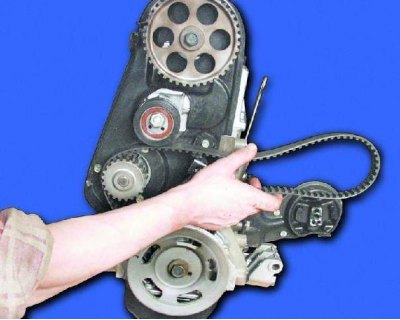
6. Remove the worn camshaft drive belt.
6. Remove the worn camshaft drive belt.


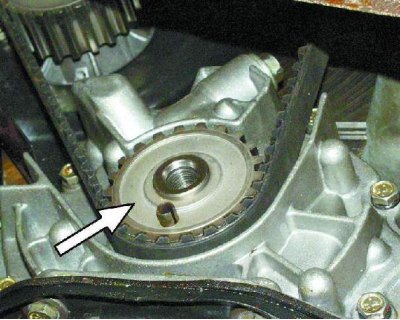
7. Install a new belt onto the crankshaft timing pulley...

7. Install a new belt onto the crankshaft timing pulley...


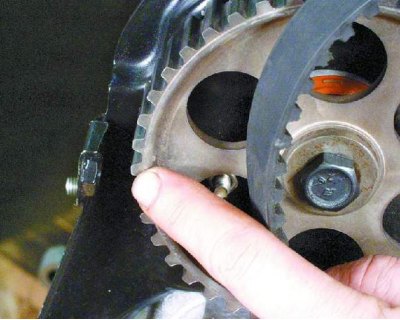
8....then onto the camshaft pulley, pulling the drive belt so that it does not sag. Make sure that the marks on the pulley and the rear cover match.
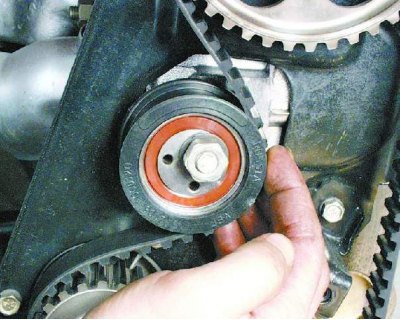
8....then onto the camshaft pulley, pulling the drive belt so that it does not sag. Make sure that…


Original source is on the resource VAZBOOK.RU

9. Place the belt on the water pump sprocket and tensioner pulley.
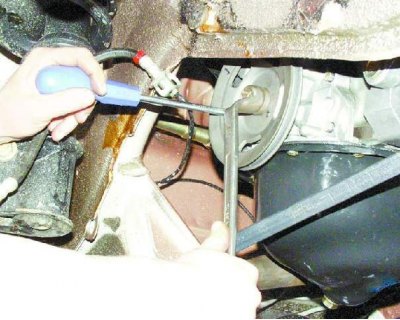
9. Place the belt on the water pump sprocket and tensioner pulley.


10. Install the crankshaft pulley and tighten its mounting bolt to a torque of 99-110 N·m (9.9-11.0 kgf·m).
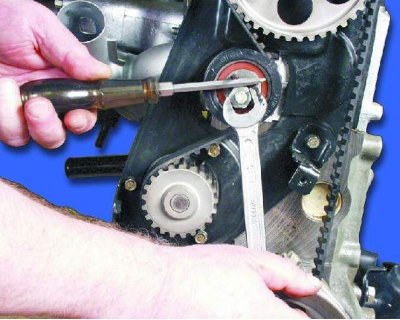
10. Install the crankshaft pulley and tighten its mounting bolt to a torque of 99-110 N·m (9.9-11.0…


11. Tighten the belt by turning the roller accordingly and tightening its fastening nut (see note).
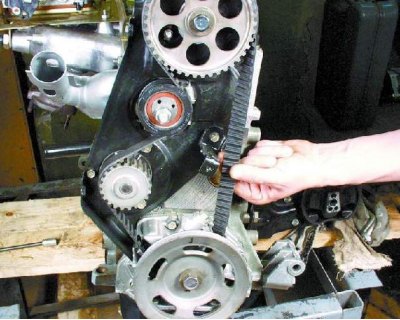
11. Tighten the belt by turning the roller accordingly and tightening its fastening nut (see note).


12. When the belt tension is correct, you can turn it 90° with two fingers (force 15-20 N). Turn the crankshaft two revolutions and check the belt tension again. Repeat the adjustment if necessary.
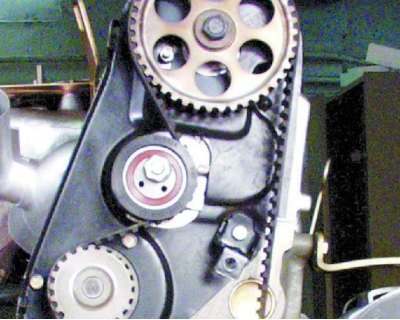
12. When the belt tension is correct, you can turn it 90° with two fingers (force 15-20 N). Turn…


Note: A special key is required to tighten the belt. If you do not have a key, insert two metal rods of the appropriate diameter into the holes in the roller. Fix a screwdriver between the rods and turn the roller, thereby tightening the belt. Then tighten the nut.
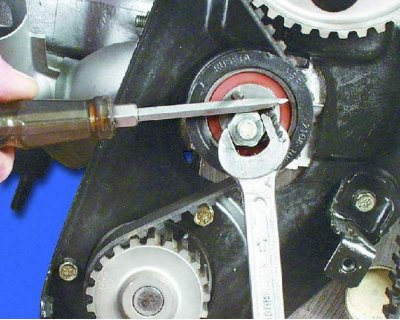

Note: A special key is required to tighten the belt. If you do not have a key, insert two metal…


13. Install the front camshaft drive cover. Then install the alternator drive belt and adjust its tension (see subsection 3.8.).


This article is available at russian, bulgarian, belarusian, ukrainian, serbian, croatian, romanian, polish, slovak, hungarian
The text was reviewed by the specialist: Grigory Vologodtsev

Share with friends:

Previous articles
VAZ-21099: Engine repair
Next articles

Replacing and adjusting the tension of the generator drive belt
Engine assembly
Cylinder head assembly
Replacing valve guide bushings
Lapping valves

More articles from other manuals on VAZ cars:
➠ Adjusting the tension of the camshaft drive belt VAZ-1111 (1988-1996)
➠ Adjusting the tension of the camshaft drive belt VAZ-21051 (1979-2010)
➠ Replacing the camshaft drive belt VAZ-2115 (1997-2012)
➠ Adjusting the tension and replacing the coolant pump drive belt VAZ-21214 (1994-2006)
➠ Adjusting the tension of the pump drive belt VAZ-21011 (1974-1983)
Link in different formats to this page


Visitor comments

No comments yet


How much will 27 + 45 ?


VAZ-21099 (1990-2004) 
  • General information
  • Specifications
  • User manual
  • Maintenance
  • Car care
  • Troubleshooting
  • Power unit
  • Engine repair
  • Cooling and lubrication system
  • Power and exhaust system
  • Transmission
  • Car gearbox
  • Clutch and drive shafts
  • Chassis
  • Car suspension
  • Steering
  • Brake system
  • Body
  • Exterior
  • Interior
  • Doors and locks
  • Electrical equipment
  • Equipment and devices
  • Lighting and signaling
  • Engine electrics
  • Ignition system


VAZ-2109 (1984-1997) 
  • General information
  • Vehicle operation
  • Vehicle device
  • Power unit
  • Engine repair
  • Cooling and lubrication system
  • Supply system
  • Transmission
  • Clutch
  • Gearbox and drive
  • Chassis
  • Car suspension
  • Steering
  • Brake system
  • Body
  • Body elements
  • Electrical equipment
  • Engine electrics
  • Equipment and devices


VAZ-2108 (1984-2003) 
  • General information
  • Introduction to guide
  • Power unit
  • Engine repair
  • Cooling and lubrication system
  • Power and exhaust system
  • Transmission
  • Clutch and drive shafts
  • Car gearbox
  • Chassis
  • Front suspension
  • Rear suspension
  • Steering
  • Brake system
  • Body
  • Exterior
  • Interior
  • Doors and glass
  • Electrical equipment
  • Equipment and devices
  • Engine electrics
  • Ignition system


VAZbook.ru © 2017 · Mobile version · Contact with administration · Sitemap: EN BG BY UA RS HR RO PL SK HU · Site search · News and articles VAZ-1111 · VAZ-11113 · VAZ-2101 · VAZ-21011 · VAZ-2104 · VAZ-2105 · VAZ-21051 · VAZ-2106 · VAZ-21061 · VAZ-2107 · VAZ-21099 · VAZ-2109 · VAZ-2108 · VAZ-2110 · VAZ-2112 · VAZ-2114 · VAZ-2115 · VAZ-2121 · VAZ-21213 · VAZ-21214 ·
The site stores technical data using cookies to improve the service.