
English Русский
Български
Беларускі
Український
Српски
Hrvatski
Română
Polski
Slovenský
Magyar
| Articles | Contacts | Sitemap |   
Repair and maintenance Lada Repair and maintenance Mazda Repair and maintenance Mitsubishi Repair and maintenance Toyota Repair and maintenance Land Rover Repair and maintenance Hyundai Repair and maintenance Nissan
VAZbook.ru


Main     1111   2101   2105   2106   2107   2109   2110   2115   2121  
VAZ-2114 (2004-2013) VAZ-2115 (1997-2012)
  • Main
  • «Samara-2»
  • VAZ-2114
  • Electrical equipment
  • Equipment and devices
  • Steering column switches — removal, inspection and installation

Steering column switches — removal, inspection and installation (VAZ-2114)

            0

Contents: Removal the switches individually ↓ Examination ↓ Installing switches ↓ Removal the switches together with…↓ Installing the connector assembly…↓
The steering column switches should be removed separately when checking and replacing them. Before disassembling the steering column and other similar work, it is advisable to remove the steering column switches together with the connector.

To complete the work you will need a multimeter.

Removal the switches individually


1. Prepare the vehicle for work and disconnect the wire terminal from the negative terminal of the battery (see "Preparing the car for maintenance and repair").

2. Remove the decorative steering column trims (see "Decorative steering column trims - removal and installation").

3. By squeezing the spring clips of the right switch, we remove it from the connector together with the connected wiring harness block.
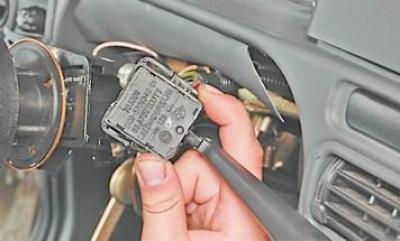
3. By squeezing the spring clips of the right switch, we remove it from the connector together with…


4. Disconnect the wiring harness connector from the switch.
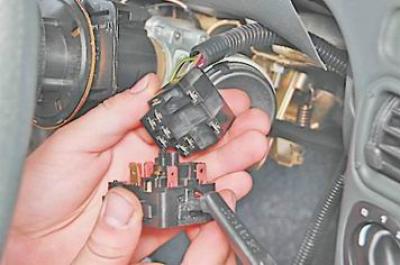
4. Disconnect the wiring harness connector from the switch.


5. Remove the left steering column switch in the same way.
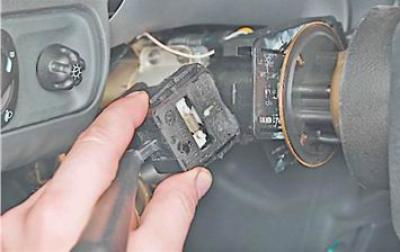


5. Remove the left steering column switch in the same way.


Examination


With a multimeter (in ohmmeter mode) we check the closure of contacts in the switches at different positions of the switch lever.
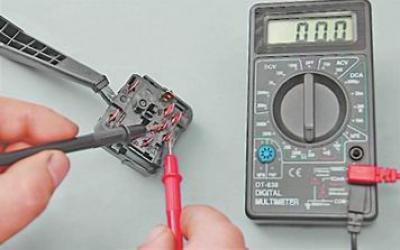
With a multimeter (in ohmmeter mode) we check the closure of contacts in the switches at different…


Note: The order of contact closure for different positions of the switch levers is shown in Table 13.9.1


Table 13.9.1. Contact closure at different positions of the steering column switch levers


Position of the shift lever

Left switch

Right switch

Closed contact terminals*

Electrical equipment included

Closed contact terminals*

Electrical equipment included

1

49a-49aL

Left turn signal

53e-53

Windscreen wiper is off

2**

49a-49aL

Left turn signal

53e-53
53a-j

Windshield wiper operation for a short time

3

-

Direction indicators are off

53e-53
53a-j

Windshield wiper intermittent operation

56-56b

Low beam headlights

4**

49a-49aR

Right turn signal

53e-53
53a-53

1st speed windshield wiper

5

49a-49aR

Right turn signal

53e-53
53a-53b

2nd speed windshield wiper

6**

30-56a

High beam headlight signaling

53e-53
53ah-53W

Windscreen Washer. Headlight Washer and Cleaner***

56-56b

Low beam headlights

7

56-56a

High beam headlights

53e-53
53ah-53H

Rear window cleaner.

8**

-

-

53e-53
53ah-53H

Rear window cleaner.

53ah-WH

Rear window washer.


* Terminal designations are printed on the switch body.


** Not a fixed position.

*** Installed on some vehicles.

Installing switches


We install the switches in the reverse order of removal.

Removal the switches together with the connector


1. Remove the steering wheel (see "Steering wheel - removal and installation").

2. Remove the decorative steering column trims (see "Decorative steering column trims - removal and installation").

3. With a socket wrench by 8 mm we unscrew the tightening bolt securing the steering column switch connector by several turns.

4. Remove the connector from the steering column.
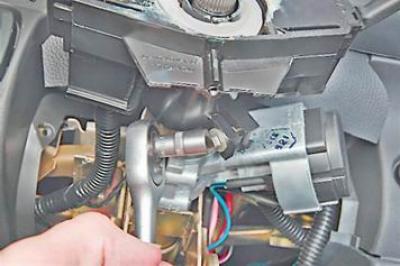
4. Remove the connector from the steering column.


5. Disconnect the two wire connectors from the horn switch contacts.
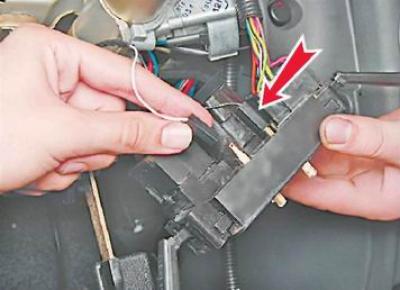
5. Disconnect the two wire connectors from the horn switch contacts.


6. Disconnect the two wiring harness connectors from the steering column switches.
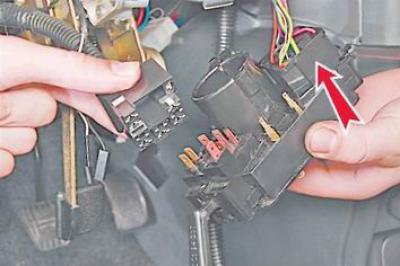
6. Disconnect the two wiring harness connectors from the steering column switches.


Installing the connector assembly with switches


1. In random order, connect the pads of the two horn wires to the steering column switch connector.

2. Place the connector on the steering column.

3. Lightly tighten the connector mounting bolt (so that the switch position can be changed by hand).

Note: It is necessary to install the steering column switch connector in such a position that the central screw for fastening the lower steering column trim can be screwed into the corresponding hole in the connector.


4. Install the lower steering column trim in place and use a Phillips screwdriver to tighten the two screws securing the trim to the instrument panel crossbar.

5. Adjust the position of the connector on the steering column, achieving the ability to screw the central screw for fastening the steering column trim into the corresponding hole in the connector.

6. Having found the optimal position of the connector, unscrew the two screws and remove the lower steering column cover.

7. Without moving the connector, tighten its mounting bolt.

8. We carry out further work in the reverse order of removal.


This article is available at russian, bulgarian, belarusian, ukrainian, serbian, croatian, romanian, polish, slovak, hungarian
The text was reviewed by the specialist: Grigory Vologodtsev

Share with friends:

Previous articles
VAZ-2114: Equipment and devices
Next articles

Hazard warning light switch — bulb replacement, removal and installation
Switches and switches
Ignition Switch (Lock) — Repair
Ignition switch (lock) — removal and installation
Ignition Switch (Lock) — Check
Dashboard Switches — Removal and Installation
Switches on the floor tunnel overlay — removal and installation
Interior Light Switches (Open Door Sensors) — Removal and Installation
Reverse Light Switch — Removal and Installation
Brake Light Switch — Removal and Installation

More articles from other manuals on VAZ cars:
➠ Steering column switches VAZ-2105 (1979-2010)
➠ Steering column switches VAZ-2106 (1976-2006)
➠ Steering column switches VAZ-2107 (1982-2012)
➠ Steering column switches VAZ-2110 (1995-2007)
➠ Chains activated by steering column switches VAZ-21214 (1994-2006)
Link in different formats to this page


Visitor comments

No comments yet


How much will 48 + 20 ?


VAZ-2114 (2004-2013) 
  • General information
  • Operation and maintenance
  • Power unit
  • Engine repair
  • Cooling system
  • Supply system
  • Control system
  • Exhaust system
  • Transmission
  • Clutch
  • Car gearbox
  • Front wheel drives
  • Chassis
  • Wheels and tires
  • Front suspension
  • Rear suspension
  • Steering
  • Brake system
  • Body
  • Exterior
  • Interior
  • Doors and glass
  • Tailgate
  • Ventilation and heating
  • Electrical equipment
  • Equipment and devices
  • Headlights and lighting
  • Engine electrics
  • Electrical circuits


VAZ-2115 (1997-2012) 
  • General information
  • Vehicle device
  • Operation manual
  • Vehicle malfunctions
  • Car care
  • Power unit
  • Engine repair
  • Cooling system
  • Supply system
  • Control system
  • Exhaust system
  • Transmission
  • Clutch
  • Car gearbox
  • Front wheel drives
  • Chassis
  • Front suspension
  • Rear suspension
  • Steering
  • Brake system
  • Body
  • Exterior
  • Interior
  • Doors, covers and windows
  • Electrical equipment
  • Equipment and devices
  • Headlights and lighting
  • Engine electrics
  • Anti-theft system


VAZbook.ru © 2017 · Mobile version · Contact with administration · Sitemap: EN BG BY UA RS HR RO PL SK HU · Site search · News and articles VAZ-1111 · VAZ-11113 · VAZ-2101 · VAZ-21011 · VAZ-2104 · VAZ-2105 · VAZ-21051 · VAZ-2106 · VAZ-21061 · VAZ-2107 · VAZ-21099 · VAZ-2109 · VAZ-2108 · VAZ-2110 · VAZ-2112 · VAZ-2114 · VAZ-2115 · VAZ-2121 · VAZ-21213 · VAZ-21214 ·
The site stores technical data using cookies to improve the service.