
English Русский
Български
Беларускі
Український
Српски
Hrvatski
Română
Polski
Slovenský
Magyar
| Articles | Contacts | Sitemap |   
Repair and maintenance Lada Repair and maintenance Mazda Repair and maintenance Mitsubishi Repair and maintenance Toyota Repair and maintenance Land Rover Repair and maintenance Hyundai Repair and maintenance Nissan
VAZbook.ru


Main     1111   2101   2105   2106   2107   2109   2110   2115   2121  
VAZ-2110 (1995-2007) VAZ-2112 (1999-2007)
  • Main
  • «Lada»
  • VAZ-2110
  • Chassis
  • Steering
  • Steering rods — removal, installation, replacement

Steering rods — removal, installation, replacement (VAZ-2110)

            0

Contents: Removal ↓ Installation ↓

Removal


1. Remove the engine protection (see "Engine protection - removal and installation").

2. Remove the steering gear shield (see points 5 and 6 "Catalytic converter of the VAZ 21124 engine manifold (1.6i) - removal, installation, replacement").

3. We press out the ball fingers of the steering rod ball joints from the rotary levers of the front suspension struts (see p. 4-6 "Tie rod end - removal, installation, replacement").

4. Using two slotted screwdrivers, remove the locking spring plate of the steering rod mounting bolts to the steering rack (for better visibility, shown with the steering gear removed).
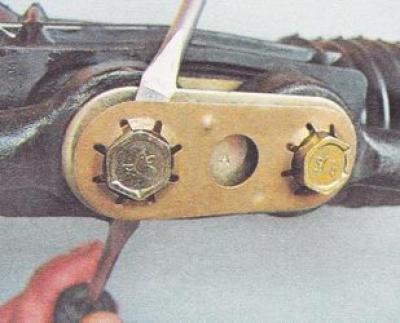
4. Using two slotted screwdrivers, remove the locking spring plate of the steering rod mounting…


Warning: Right and left steering rods are not interchangeable.


5. Using a 15 mm socket wrench, unscrew the bolts securing the steering rods to the steering rack of the steering mechanism.
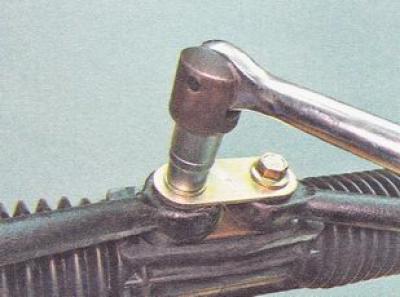
5. Using a 15 mm socket wrench, unscrew the bolts securing the steering rods to the steering rack…


6. Remove the top plate and disconnect the steering rods from the steering gear.


7. If necessary, pry off the bottom plate with a slotted screwdriver.
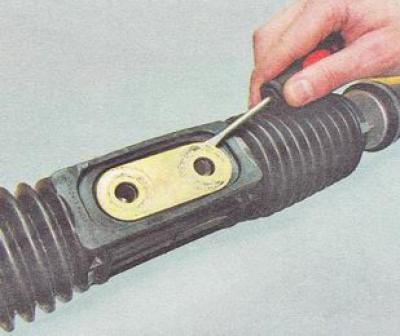
7. If necessary, pry off the bottom plate with a slotted screwdriver.


Installation


1. Before installing new steering rods, make sure that their threaded inserts are screwed into the rods and ends with the same number of thread turns.

2. For the removed steering rods, measure the distances between the holes in the silent blocks for attaching them to the steering mechanism (1) and the centers of the plugs for the holes for the ball pins in the steering rod ends (2).
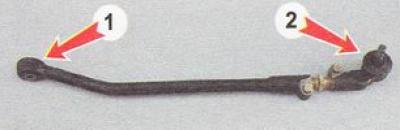
2. For the removed steering rods, measure the distances between the holes in the silent blocks for…


3. Rotating the threaded insert, we select the length of the new steering rods in accordance with the length of the removed steering rods, after which we tighten the tightening bolts of the steering rod and steering rod end.

4. Install and connect the steering rods in the following sequence: secure the inner ends of the steering rods to the steering mechanism by tightening the bolts that secure them.


5. Insert the ball joint pins of the steering rods into the holes of the strut pivot arms, tighten and cotter the nuts that secure them.

6. We install the car on the wheels.

7. Tighten the bolts securing the steering rods to the steering gear to a torque of 70-86 N·m (7.2-8.6 kgf·m).

8. Install the locking plate and protective cover.

9. Install engine protection.

10. We adjust the camber and toe-in of the front wheels in a specialized auto repair shop.

The article is taken from the website VazBook.ru


This article is available at russian, bulgarian, belarusian, ukrainian, serbian, croatian, romanian, polish, slovak, hungarian
The text was reviewed by the specialist: Grigory Vologodtsev

Share with friends:

Previous articles
VAZ-2110: Steering
Next articles

Tie Rod End — Removal, Installation, Replacement
Steering column bearings — replacement
Steering column assembly — removal, installation, replacement
Steering column tilt mechanism — adjustment
Decorative steering column trims — removal, installation, replacement
Steering gear assembly with steering rods — removal and installation
Steering rack boot — removal, installation, replacement

More articles from other manuals on VAZ cars:
➠ Checking the ball joints of the steering rods VAZ-2105 (1979-2010)
➠ Steering rods — replacement VAZ-2106 (1976-2006)
➠ Steering rods — replacement VAZ-2107 (1982-2012)
➠ Checking the condition of the steering rods and steering… VAZ-21099 (1990-2004)
➠ Steering rods — removal and installation VAZ-2114 (2004-2013)
Link in different formats to this page


Visitor comments

No comments yet


How much will 50 + 39 ?


VAZ-2110 (1995-2007) 
  • General information
  • Vehicle description
  • Specifications
  • User manual
  • Maintenance
  • Operation and maintenance
  • Tips for car owner
  • Power unit
  • Engine repair
  • Supply system
  • Control system
  • Cooling system
  • Exhaust system
  • Transmission
  • Clutch
  • Car gearbox
  • Front wheel drives
  • Chassis
  • Suspension and wheels
  • Steering
  • Brake system
  • Body
  • Exterior
  • Interior
  • Doors and glass
  • Tailgate
  • Ventilation and heating
  • Electrical equipment
  • Equipment and devices
  • Headlights and lighting
  • Engine electrics
  • Electrical circuits


VAZ-2112 (1999-2007) 
  • General information
  • Operation and maintenance
  • Power unit
  • Engine repair
  • Supply system
  • Control system
  • Cooling system
  • Exhaust system
  • Transmission
  • Clutch
  • Car gearbox
  • Front wheel drives
  • Chassis
  • Wheels and tires
  • Car suspension
  • Steering
  • Brake system
  • Body
  • Exterior
  • Interior
  • Doors and glass
  • Tailgate
  • Ventilation and heating
  • Electrical equipment
  • Equipment and devices
  • Headlights and lighting
  • Engine electrics
  • Electrical circuits


VAZbook.ru © 2017 · Mobile version · Contact with administration · Sitemap: EN BG BY UA RS HR RO PL SK HU · Site search · News and articles VAZ-1111 · VAZ-11113 · VAZ-2101 · VAZ-21011 · VAZ-2104 · VAZ-2105 · VAZ-21051 · VAZ-2106 · VAZ-21061 · VAZ-2107 · VAZ-21099 · VAZ-2109 · VAZ-2108 · VAZ-2110 · VAZ-2112 · VAZ-2114 · VAZ-2115 · VAZ-2121 · VAZ-21213 · VAZ-21214 ·
The site stores technical data using cookies to improve the service.