




- multimeter;
- power supply with adjustable voltage up to 20 V or battery charger;
- three or two jaw puller;
- mandrel from the cup puller kit for pressing out the front bearing.
Disassembly
1. Remove the generator from the car.
2. After pressing three spring clamps, remove the protective cover of the generator rectifier block.
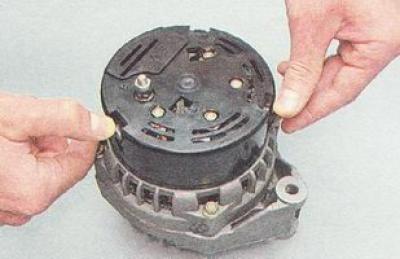
3. Using a Phillips screwdriver, unscrew the two screws securing the voltage regulator.
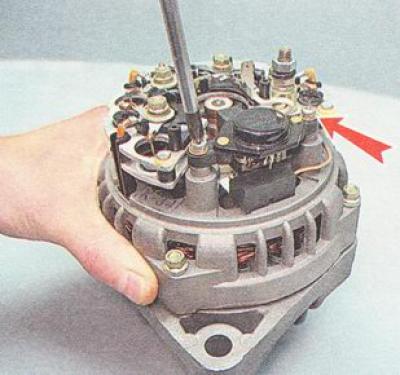
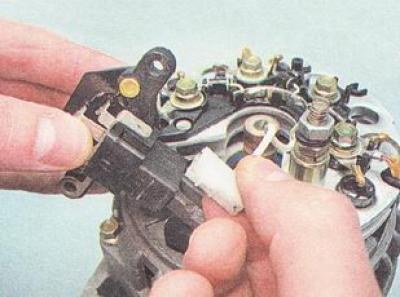
4. Disconnect the wire connector from the voltage regulator terminal and remove the voltage regulator from the generator.
5. Using an 8 mm open-end wrench, unscrew the three bolts connecting the stator winding terminals to the rectifier unit (1), and another bolt securing the rectifier unit (2) (remember how the isolating and thrust washers are installed).
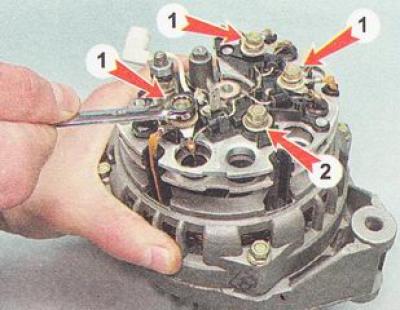
6. Carefully bend the generator stator winding terminal wires to the side.
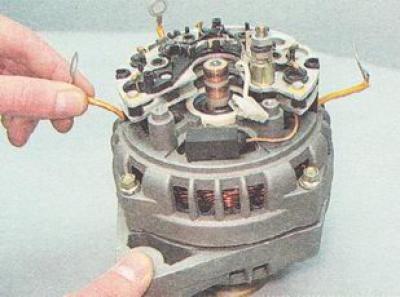
7. Using a Phillips screwdriver, unscrew the screw securing the capacitor.
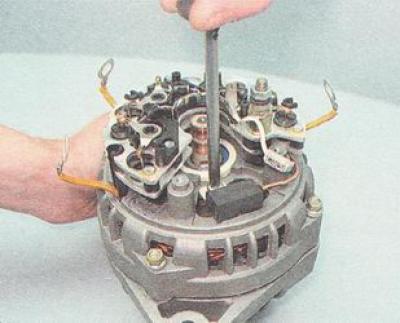
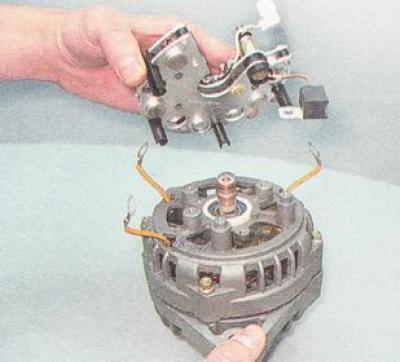
8. Remove the rectifier unit together with the capacitor from the generator. Use a 10 mm socket wrench to unscrew the two nuts of the contact bolt. Remove the spacer and insulating bushings from the bolt, take the bolt out of the rectifier unit and remove the capacitor tip from the contact bolt.
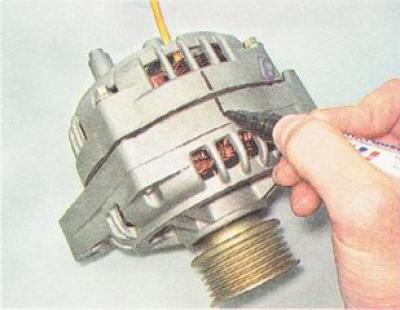
9. Using a marker, mark the relative positions of the front and rear covers of the generator (to simplify assembly).
10. Using an 8 mm socket wrench, unscrew the four bolts holding the front and rear covers of the generator.
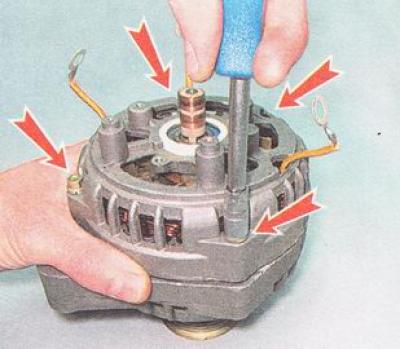
11. Using a slotted screwdriver, carefully move the generator covers apart.
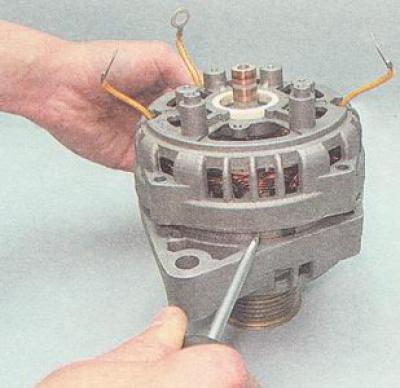
12. Disconnect the rear cover together with the stator winding from the front cover of the generator.
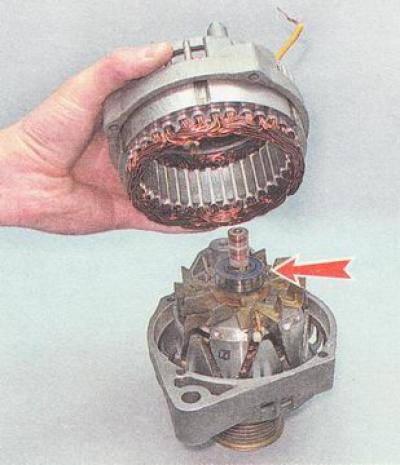
Recommendation. To determine the technical condition of the rear bearing, shake it from side to side and vigorously rotate its outer ring. The generator bearing should not have significant play, and the ring should rotate freely without jamming or extraneous noise. A faulty generator bearing must be replaced.
13. Using a marker, make a mark on the stator (to indicate its position relative to the rear cover of the generator).
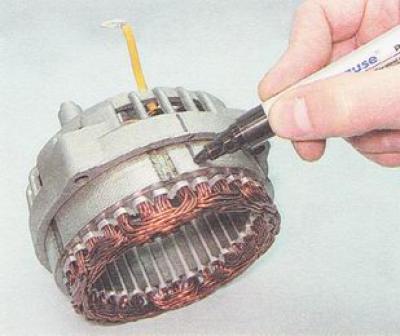
14. Remove the stator from the rear cover of the generator.
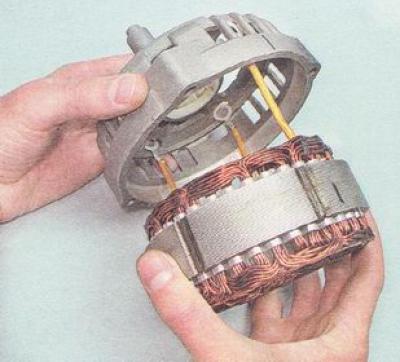
Recommendation. To determine the technical condition of the front generator bearing, hold the pulley with your hand, swing it from side to side and rotate the front generator cover. If the bearing is jammed, has significant play, or makes noise when the cover is rotated vigorously, it must be replaced.
Helpful advice. The manufacturer recommends replacing the front rotor bearing together with the generator front cover, as it is rolled into the cover. However, given that the cost of the bearing is significantly lower than the cost of a new front cover and, especially, the generator assembly, it is advisable to press out and replace the faulty bearing.
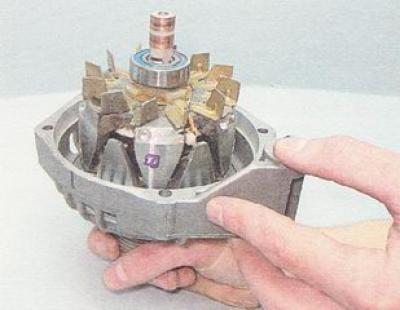
15. If it is necessary to replace the front generator bearing, use a 24 mm socket wrench to loosen the pulley mounting nut while holding the pulley with sliding pliers.
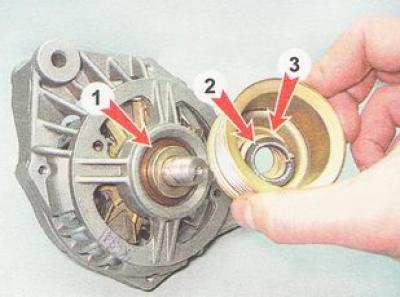
16. Remove the pulley with the spring (3) and flat washer (2), and the spacer sleeve (1) from the rotor shaft.
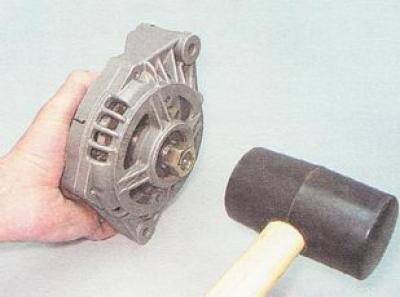
17. Screw the generator pulley mounting nut onto the rotor shaft thread (flush with end). Using a rubber-headed hammer, press the rotor out of the front bearing on the nut.
18. If it is necessary to replace the front generator bearing, install the front cover in a vice (the jaws of the vice should be fitted with soft metal pads).
19. Having selected suitable mandrels from the cup puller kit, press out the bearing from the seat in the front cover of the generator.
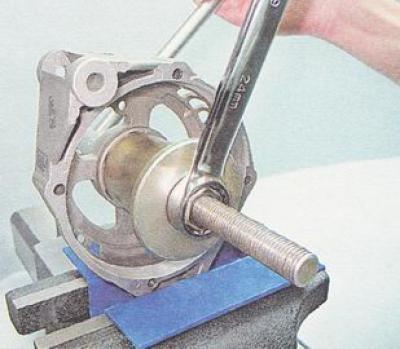
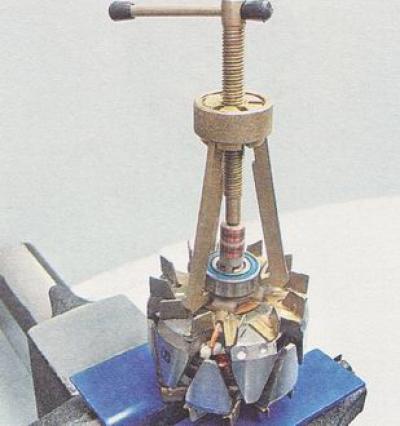
20. If it is necessary to replace the rear generator bearing, secure the rotor in a vice with soft pads on the jaws. Use a universal puller to press the rear bearing off the rotor shaft.
Examination
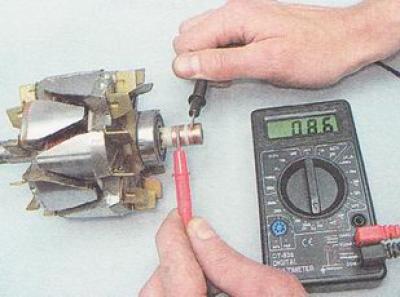
1. Check the generator rotor windings: a) by applying the ohmmeter probes to the rotor contact rings, check the excitation winding for breakage. The resistance of a serviceable excitation winding should be 5-10 Ohms;
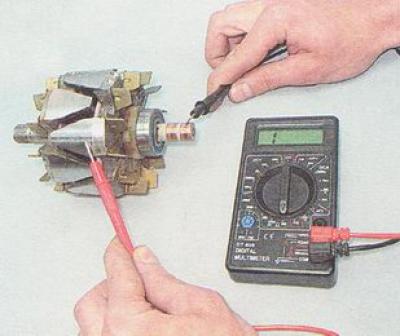
b) by connecting the ohmmeter probes to any contact ring and to the rotor, we check the excitation winding for short circuit to ground. If the rotor winding is in good condition, the ohmmeter should show infinite resistance.
2. Check the generator stator windings:
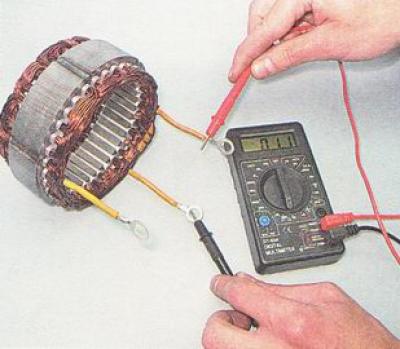
a) alternately connecting the ohmmeter probes to the stator winding terminals, we check the winding for a break. If there is no break, the ohmmeter will show low electrical resistance (about 10 Ohm);
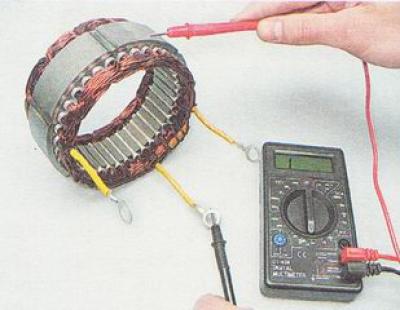
b) by connecting the ohmmeter probes to any terminal of the winding and to the stator, we check the stator winding for short circuit to ground. If there is no short circuit, the ohmmeter should show infinitely high resistance.
3. Check the generator rectifier block:
Note: A good semiconductor diode conducts current in only one direction. A diode is faulty if it does not conduct current or conducts current in both directions.
a) connect the positive lead of the ohmmeter (in diode test mode) to the common bus of the auxiliary diodes (1), and the probe of the negative terminal to the terminal of the diode being tested (2). A serviceable diode should not pass current (resistance tends to infinity);
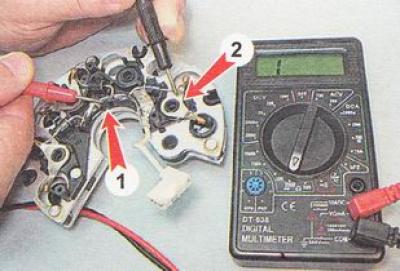
b) change the tester probes. If the diode is working properly, the ohmmeter should show the presence of resistance (several hundred ohms). We check the other two auxiliary diodes in the same way;
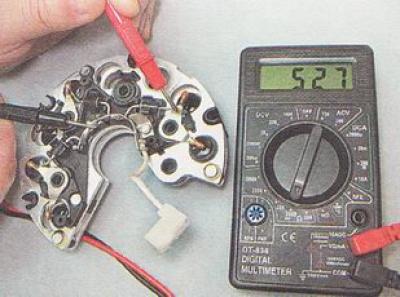
c) connect the probe of the negative terminal of the ohmmeter to the plate of the generator rectifier block, into which the diode being tested is pressed, and the probe of the positive terminal to the diode terminal. A serviceable diode should not
pass current (resistance tends to infinity);
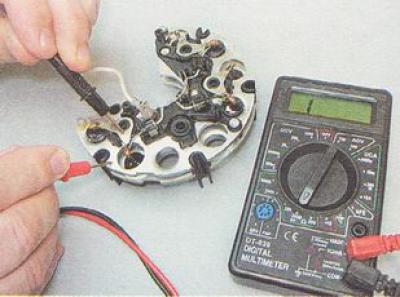
d) swap the tester probes. If the diode is working properly, the ohmmeter should show a resistance of several hundred (Ohm).
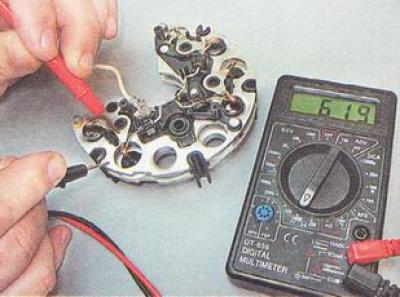
We check other power diodes of the generator in the same way.
4. Check the generator voltage regulator:
a) inspect the brushes of the generator voltage regulator, make sure they are mobile. If the brushes are broken or badly worn (protrude from the brush holder by no more than 5 mm), or the brushes are jammed in the brush holder, in which case the voltage regulator must be replaced;
b) to check the voltage regulator, we assemble the simplest circuit (see below). We connect the negative terminal of the power source to the "ground" of the voltage regulator with a wire, and the positive terminal to its terminal. We connect the test lamp to the brushes of the generator voltage regulator.
Warning: When connecting the voltage supply wires to the generator voltage regulator, strictly observe the polarity. Incorrect connection of the wires will damage the voltage regulator.
We use a voltmeter to control the voltage supplied to the voltage regulator;
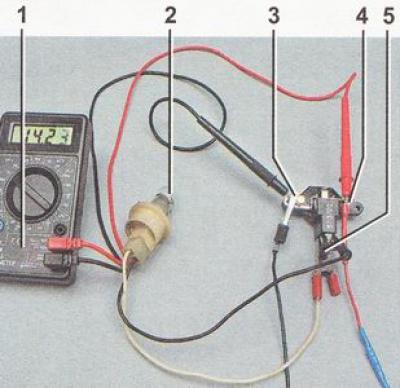
Generator voltage regulator relay test diagram: 1 - multimeter (in voltmeter mode); 2 - control lamp; 3 - voltage regulator "ground"; 4 - generator voltage regulator output; 5 - brushes
c) turn on the power supply and apply 13 V to the voltage regulator. The control lamp should light up, indicating that with such voltage in the vehicle's on-board network, the excitation current will flow to the generator rotor winding;
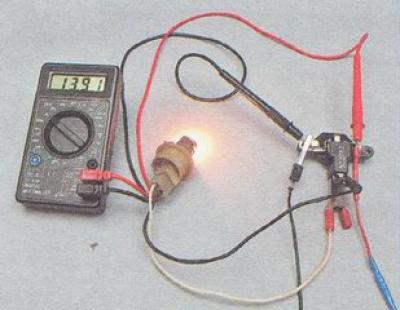
d) gradually increase the voltage until the control lamp goes out. The voltage at which the control lamp goes out should be 14.5-14.7 V.
d) Reduce the supplied voltage until the control lamp lights up again. The voltage at which the control lamp lights up should not be lower than 13.2 V. 5. Checking the capacitor:
Note. The generator capacitor capacity can only be measured with a special device. You can verify the capacitor is faulty using an ohmmeter with a measurement limit of at least 1000 kOhm.
We connect an ohmmeter to the terminals of the capacitor and observe its readings. If the capacitor is not broken, then when connecting the terminals of the device to it, the ohmmeter will initially show a small resistance, then this resistance will quickly increase until it stabilizes. A similar change in the ohmmeter readings should be repeated when changing the polarity of the device.
A faulty rotor, stator, capacitor or voltage regulator must be replaced. If one or more diodes in the generator rectifier unit are faulty, the entire unit must be replaced.
Assembly
Warning. Before pressing the front alternator bearing into place, it is necessary to check the bearing seat and, if necessary, use a knife or scraper to restore the chamfer where the edges of the hole have remained dented. When pressing the front bearing into the alternator cover, the force must be transmitted only to the outer ring of the bearing.
1. Having selected suitable mandrels from the cup puller kit, press the new front generator bearing into the seat in the front cover until it stops.
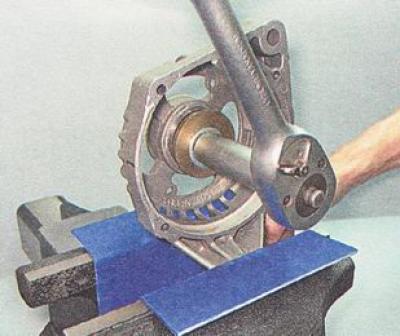
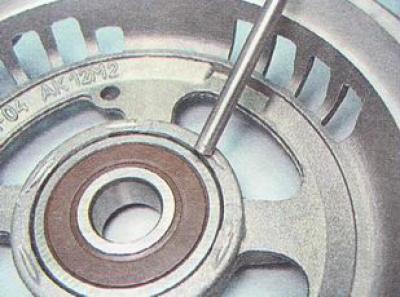
Warning: When performing the following work, use only light hammer blows. Hard blows may crack the generator cover, which is made of brittle aluminum alloy.
2. Using a steel drift of a suitable diameter and a hammer, restore the bearing crimp in the generator cover.
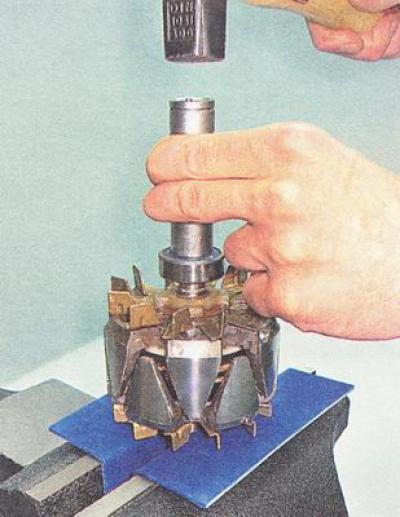
Warning: Before installing the rear generator bearing, make sure the rotor shaft is securely clamped in a vice. Place a suitable sized block of wood under the rotor shaft to avoid damaging the front rotor impeller during pressing. To avoid damaging the bearing, only strike the inner ring.
3. Using a piece of pipe of a suitable diameter (you can use a 19mm deep socket) we press the new generator bearing onto the rotor shaft until it stops.
Further assembly of the generator is performed in the reverse order of disassembly. In this case, we align the marks applied to the covers and the generator stator. Finally, tighten the tie bolts evenly, crosswise, in several steps of half a turn. Having tightened the bolts, we make sure that the rotor rotates easily (the rotor task may be due to the skewing of the covers). Before tightening the stator winding mounting bolts, make sure that insulating washers are installed under their heads.
Warning: When installing the generator voltage regulator, do not apply lateral force to the brushes.